The Aim of this blog is to have one repository of user reviews of the gadgets used by them.

Show your support by becoming a follower of this blog.
If you wish to share your review of your device, just send in the abstract to: techenrepot@gmail.com
and then you will be added as a co-author after which you can post any number of reviews or write ups.


Thursday, May 19, 2011

Installing maps onto Samsung WB650(HZ35W) Camera

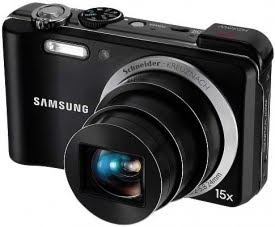
Samsung WB650 or HZ35W is one of the best compact zoom cameras. You can find the review of the camera Samsung WB650 or Samsung HZ35w(thats how its named in the US) here. The stand out feature for this camera is the ability to geo-tag photos with GPS. It also has a dedicated mode where you can view the photos taken with GPS in a map. But Samsung however did not provide a clear procedure on how to install the maps.


So here I intend to give the step by step procedure on how to install the maps onto Samsung WB650(HZ35W).Remember these steps are absolutely not required to take photo with GPS enabled. Its required only if you intend to use the map view mode to see the photos in maps in your camera.


Samsung has restricted the download of the maps to only 3 times. If your download exceeds thrice then you may not be able to download the maps any further. So here we go:

Step One: Go to www.samsungimaging.com and register your product(top right corner). Then from the home page select maps download at the bottom right corner of the home page. Clicking it should prompt you to provide your name, country and the serial number of your camera found near the battery department.

Step Two: Click submit and then read the license agreement. Click agree to proceed. That should take you to the download page.

Step Three: Download the three zip files that are required. They are
a)City Name(zip file).(Common for all countries)
b)Base map(zip file).(Common for all countries)
c)Your country map for example IND_08Q3.zip in my case India that is.
Remember these files are huge files so make sure you are on a good Internet connection.

Step Four: Create two folders namely city and mapview(upper/lower case doesn’t matter) in the SD Card.

Step Five: Unzip the city.zip file that you downloaded, that should give a file called world.adm. Copy that file into the folder named city.

Step Six: Unzip the mapview.zip file and that should show you two folders and a file namely Map,res and a file called system.ini. Copy these two folders Map,res and the file system.ini into the folder mapview.

Step Seven: Now we have unzipped two files that are downloaded. Unzip the last file with your country specific name and in my case it is IND_08Q3.zip that corresponds to India. That should give you two files with extensions .cfg and .bgf. Copy these files into the Mapview/map folder (in the map folder available within the Mapview folder).

Step Eight: Now all done, this is the final and optional step.The .cfg file basically is a configuration file that stores a default location. It is this default location that is used when the GPS lock is unavailable. All you have to do is write down the GPS co-ordinates of your default location to this file. To know your locations GPS co-ordinates go here and type your location. That should give you two co-ordinates namely Latitude and Longitude. Now open the .cfg file, go to the column named “CEN_LON=” and append it with the Longitude value. Go to the column named “CEN_LAT=” and append it with the Latitude value. Thats it. The picture below should give you a fair idea.


You can copy maps files of any country. All you have to do is just put in that country's respective .cfg and .bgf files in the Mapview/map folder (in the map folder available within the Mapview folder).

If you would like to have a look at some awesome photos from this camera check it out here. One of the photo also won the Streets Scenery challenge 2011 in www.samsungimaging.com which can be seen here. And one photo awarded as the best photo is available in the Must watch gallery of the site
www.samsungimaging.com that can be seen here. You are free to use the photos anyway but link back to this blog. And of course you cannot commercialize those photos :). More details on the free usage can be seen here.

The comments section is open for discussions :).

Tuesday, May 10, 2011

Flashing Sony Ericsson Xperia phones

Do you own any of the Xperia line up of Android Phones?Are you a kind of person who wants to fiddle around with your Android phone like a geek? Are you the kind of person who wants to learn android porting and customizing your Android builds?


If yes there are many sites that do that but for the first time the leading manufacturer Sony Ericsson that is; have come up with step by step procedure to flash their phones.That sounds very interesting isn't it?


But be warned, though the entire procedure comes from the manufacturer, the device's warranty will be void on flashing.But its an interesting move from Sony Ericsson to get involved with its customers. The procedure is very crips and clear and it may work on other devices too. Want to have a go? Check out the Sony Ericsson's blog here:


They also point out at the famous XDA Developers Blog which they claim to be monitored by Sony Ericsson for all the questions on unlocking boot-loaders to flashing on their devices.It can be found here


Friday, April 29, 2011

Free Wallpapers Under Creative Commons

Hello Readers,

I am glad to share you all with some of my photos which are with Creative Commons Licence.You can check the complete collection of my Creative Commons wallpaper here. You are free to modify change and redistribute the photos except that you cannot commercialize the wallpaper and that you have to link back to this blog.You can get a copy of the license here.

If you do use the wallpaper then link back to

http://techentrepot.blogspot.com/p/photography.html

(also available on each image's top right corner) and leave in a comment so that I can know you used it:).


If at any point you want a full resolution image drop in a request mail with the link to the image you need and send it to: techenrepot@gmail.com.I will send you the full resolution image ASAP.

Few images also have GPS co-ordinates and Location information. If you want to know where the image was taken just copy the co-ordinates, paste into the the site maps.google.com and hit enter.

For example in this image:


The location information (co-ordinates) is 11.426406,76.660764(separated by commas) into maps.google.com as shown in the pic below(green arrow):


Have Fun :)

Feel free to browse and leave a comment:


Check Out Remolon Ribiers Creative Commons Wallpapers

Tuesday, February 8, 2011

Samsung WB650 (HZ35w) Camera Review

It’s been a long time since I had written a review and a post in my blog since I was held up with some work. So here I come again, this time around I will discuss about a camera that I bought on November 2010. As usual I shall start up with what my requirement was and how I short-listed my Photo Machine.

This isn’t a complete review because I felt am too noob to do an in-depth review (as not is incase of mobile) instead I’ll point to the sites that do a better review and share how I short listed my machine together with its Pros and Cons that I could find in these 3 months of time.


Introduction:

It was my long time dream to buy a machine to do some serious photography with a limited budget. I wanted a machine that will give full control plus offered good features on a descent budget. So I decided on some key requirements such as:

  • *Good image quality and Mega-pixel count wasn’t an issue for me.
  • *Full manual control so that i can learn photography.
  • *Around 10x zoom.
  • *With Li-Ion battery.
  • *Wide-angle lens.
  • *Budget around 14-15K this is a bit high but on little research I found that getting all these features on one package would be around 14-20K.

So when I Googled for these features the first direct hit went to www.dpreview.com. It’s a superb site with professional offering in and out detailed review of the device. In that site I found a group test of Travel Zoom Cameras that were satisfying all my requirements.

The Review and My selection:

Here is the review of all these devices:
Compact Super Zoom Camera Group Test.
The above link will give you all accessories details and full features each of the cameras.
Now I would like to tell you all something. If you carefully read those reviews its very clear that every camera has got its own pros and cons. The conclusion would point out on a Winner but however it does not mean that other cameras are not up to the mark. So I clearly went through each of the cameras review and compared as to what each of these cameras had against each other. So now there were the following cameras that satisfied my requirements.
Panasonic TZ8(ZS5 in US), Casio FH100, Sony H55, Nikon S8000, Samsung WB650(HZ35W in US) and canon Sx210IS.

But among these only Panasonic TZ8, Sony H55 and Samsung WB650/WB600 were within my reach, satisfying my requirements and was available.

And Sony H55 didn’t have full manual control so I had to skip Sony too and Casio didn’t have any market in India.

So now am left with Panasonic Tz8 and Samsung WB650/600 both of them cost the same. Now according to the review Samsung is the Gold award winner but that is not the only reasons that I selected it but for these:

  • *15x Zoom: While Panasonic offered only 10x, this had 15x zoom which is good to have.
  • *VGA Resolution AMOLED:Since I had already missed an AMOLED (check this to know about that), this time around I wanted to own one. While others offered LCD, Samsung offered High resolution(VGA) AMOLED which offers very bright, vivid and contrasting images. And also it saves a lot of your battery power and offers better viewing angles in direct sunlight than the TFT LCD, which is crucial for me.
  • *GPS:This is another good to have feature that’s not available in the Panasonic Tz8.

I always wanted to own a Leica lens (Panasonic Cameras have them) but looking at the features WB650 had, again with Tz8 for the same prize and the Gold Award supporting the cause; I zeroed on to WB650.

I hope this small write up would help you shortlist the right device for the right price.

Initially I did have confusion between WB650 and WB600 but settled down with WB650 for its AMOLED :).

FYI WB650 was selling for RS.16500 and WB600 for Rs.13000. The main Difference is that WB600 doesn’t have an AMOLED Screen and the GPS.

My Experience:

This is what dpreview.com states about the cons of this device:
  • *Slow lens @ the long end of the zoom i.e. when you zoom crosses 10x it becomes a bit slower.
  • *Hesitant focus in low light
  • *Poor GPS implementation.

In fact all of them are true. For the GPS part there is a work around which you can check out in the blog post here. And here are some of them, which I experienced.

  • *Certain color like light pink/red and orange are over exposed/saturated.
  • *While zooming in the video mode the zoom noise is present and is irritating. As a work around, Samsung has given an option to mute sound while zooming alone.
  • *Flash Power isn’t all that good and its range is comparatively less with all other models.
  • *Poor image quality in low light.
  • *Smart Auto is not smart enough. Other dedicated modes work better.
Now on the Positive side here are some of its advantages:

  • *Overall Very good image quality.
  • *Offers full manual control (A.S.M) and Program mode.
  • *Good number of preset modes like: Portrait, beauty, landscape, Close up, Text, Sunset, Dawn, Backlight, fireworks etc.
  • *Good Video quality (720p).
  • *Very good zoom performance.
  • *Good battery life
  • *Good GPS performance (On a clear sky it just takes 3-5 seconds to get a satellite lock)
  • *Have a number of in-house editing options such as brightness, contrast, saturation, filters and more...
  • *The camera has 128MB memory housing Intelli studio software, which is very good at offering tasks such as image editing, image synchronization and a smart album. All you have to do is just plug in your camera in the USB and Intelli studio starts automatically on your PC from your camera (you also have the option to install it on the PC). Just give in the path where the images have to be stored and Intelli studio transfers the images and synchronizes the images from camera to PC. This greatly reduces the pain of copying and pasting the images.
  • *USB charging. This ensures that your camera charges every time you plug into your PC so that your camera never is short of power.*In house Map view, but the details up to street level are available only for select metropolitan cities for India. Has support form many countries.

And finally here are the images that I had taken using this camera for you perusal.
And here you can find all of my best photos taken using this camera with Creative Commons License.


Battery Life:

On a heavy usage such as Macro focusing which involves heavy movement of the lens in and out, changing modes,Some GPS locks and some in-house editing; it gave me 213 shots( Samsung states 220 shots without flash). If you ask me this is pretty good and it only increases if you maintain your battery well. Check this to know how to maintain Li-ion batteries.


Conclusion:

Samsung WB650 with a Schneider-kreuznach lens is a very good camera covering all-important features and I felt it’s a good value for money. On the negative side the camera is very poor on low light conditions and does not focus in low light conditions. So overall I felt it’s a good package.


Once again, Samsung wb650 had all the important features that I wanted hence I grabbed it baring the low light photography, which anyway I am not going to do it. So if you have my requirements then you can very well go ahead with WB650. If you feel its a bit costly then you can go for WB600, which sells for 13K barring AMOLED and GPS.

And if not for WB650/WB600 I would have definitely bought either of these following camera in the order:

Panasonic TZ8
Sony H55
Nikon CoolPix S8000
Canon Power shot SX210 IS
Fujifilm FinePix F80 EXR
Fujifilm FinePix JZ500

All of these cameras are worth having a look at.

So if you are looking to buy a camera, dont forget to check these two websites:
dpreview.com
Photographyblog.com

Have Fun!

The comments section is always open for discussions.
PS: All the cameras that i had mentioned above fall in the price range of 15k to 20k as of Novemeber 2010.

Thursday, September 30, 2010

Leads#3: Budget Android Phones in India Rev.2

Its been quite a long time since the last post. In this post I will be discussing some of the budget android phones that is currently available in the Indian market as of September 2010.


This post can be considered a sequel to my earlier post on budget phones here. Before we can jump into our list of devices, it will be very much helpful to you if you can understand the nuances of touch screen phones here so that it will help you zero on the right device. Lets get down to business right away with a small picture graph for some insight into growth of Android.


source:


1) Samsung Galaxy 5 i5500


· Operating system: Android V2.1 with TouchWiz 3.0
· Networks: GSM 850/900/1800/1900 MHz, EDGE/GPRS, HSDPA 900/2100
· Processor: 600 МHz processor
· Internal: 170 MB(256 MB RAM,512MB ROM) + microSD (hot swappable)
· Interfaces: Wi-Fi b/g,DLNA, Bluetooth 2.1+EDR(A2DP), microUSB (USB 2.0, 3.5 mm headphones jack
· Screen: TFT LCD - capacitive , 2.8” 240x320 pixels resolution (QVGA),256k colors
· Camera: 2 MPx with LED Flash
· Other features: GPS , A-GPS, Accelerometer, FM Radio,SWYPE text input.
· Battery: removable Li-Ion 1200 mAh

First on our list is the Samsung Galaxy 5, which is an affordable budget phone. If you are on a tight budget and are looking for a smart phone stop here, just go ahead and buy this small droid. It has a capacitive screen, which ensures good touch sensitivity. It has got all the features that the higher end phones have except for the small screen with a low QVGA resolution. Samsung Galaxy 5 i5500 sells for around Rs 9000/-


2) Spice Mi-300


· Operating system: Android V1.6/2.1
· Networks: GSM 850/900/1800/1900 MHz, EDGE/GPRS, HSDPA 900/1900/2100
· Processor: Qulacomm MSM7225 528 MHz
· Internal: 156 MB+ microSD
· Interfaces: Wi-Fi b/g, Bluetooth 2.0+EDR(A2DP), microUSB (USB 2.0, 3.5 mm headphones jack
· Screen: TFT LCD - capacitive , 3.2” 480x320 pixels resolution (HVGA),16M colors
· Camera: 5 MPx with LED Flash
· Other features: G-Sensor, Proximity Sensor
· Battery: removable Li-Ion 1230 mAh

And for the first time we see an Indian Phone manufacturer coming up with an Android device. This phone has a very descent spec, especially a 3.2” screen with a HVGA resolution. It is also based on the Qualcomm platform, which ensures a good processing power. Initially when the phone was launched it came up with Android V1.6 but later the devices are coming up with Android V2.1. You can check out a small video on this device here:. The Spice Mi-300 sells for around Rs 10,000/-


3) Videocon V7500 Zeus


· Operating system: Android V1.6 upgradeable to V 2.1
· Networks: GSM 850/900/1800/1900 MHz, EDGE/GPRS, UMTS 2100, HSDPA 7.2MBPS/HSUPA 2MBPS
· Internal: 512 MB + microSD
· Interfaces: Wi-Fi b/g, Bluetooth 2.1 (A2DP,GAP,HFP,HSP), microUSB (USB 2.0), 3.5 mm headphones jack
· Screen: TFT LCD - capacitive , 3.2” 480x320 pixels resolution (HVGA),262K colors.
· Camera: 5 MPx with Auto Focus
· Other features: GPS , A-GPS, digital compass, accelerometer, proximity sensor.
· Battery: removable 1230 mAh(two batteries provided)

After Spice jumped up into the Android arena, another Indian phone manufacturer, Videocon have come with their device called Zeus. Like the Spice MI-300, Zeus is also a very descent mobile with good spec sheet. It comes with Android V1.6 but Videocon has promised an update to V2.1 in the end of October. Videocon has provided two batteries with the pack,one as a back up battery. The expected price for Videocon V7500 Zeus is around Rs 10,000/-.


4) LG Optimus GT-540


· Operating system: Android V1.6/V2.1 with Custom UI
· Networks: GSM 850/900/1800/1900 MHz, EDGE/GPRS, HSDPA 900/2100, HSDPA 850/2100
· Processor: Qulacomm MSM7227 600 МHz processor
· Internal: 130 MB(256 MB RAM & ROM) + microSD
· Interfaces: Wi-Fi b/g, Bluetooth 2.1 (A2DP), microUSB (USB 2.0, 3.5 mm headphones jack
· Screen: TFT LCD - Resistive , 3.2” 320x480 pixels resolution (HVGA) 256k colors
· Camera: 3.2 MPx with autofocus
· Other features: GPS , A-GPS, Accelerometer, FM Radio,Divx Certified Device
· Battery: removable Li-Ion 1500 mAh

Optimus GT-540 is the second Droid from LG after the LG – Gw620. The earlier model did not make a cut in the Indian market despite having similar features and a slide out keyboard. This phone has a major set back with its Resistive screen which I think doesn’t do justice to androids, especially when phones which cost lower than this such as Samsung Galaxy 5 have a capacitive screens. But other than the resistive screen the Optimus has a very good spec sheet. It has got a HVGA resolution screen and a DivX certification which means there is no need for you to convert all those .avi(Divx/Xvid rips) and .divx files. Just copy them to your card and voila the phone plays it for you without any hitch. The phone in the US shipped with Android 1.6(remember you will not be able to send files via Bluetooth in this version) but LG announced that it would ship with Android V 2.1 in India. The LG Optimus GT-540 sells for around Rs 11,500/-


5) Samsung Galaxy 3 i5800/i5803


· Operating system: Android V2.1 with TouchWiz 3.0
· Networks: GSM 850/900/1800/1900 MHz, EDGE/GPRS, HSDPA 900/2100
· Processor: 667 MHz processor
· Internal: 256 MB RAM,512MB ROM + microSD (hot swappable)
· Interfaces: Wi-Fi b/g/n,DLNA, Bluetooth 3.0+EDR(A2DP), microUSB (USB 2.0, 3.5 mm headphones jack
· Screen: TFT LCD - capacitive , 3.2” 240x400 pixels resolution (WQVGA),16M colors
· Camera: 3.2 MPx autofocus
· Other features: GPS , A-GPS, Accelerometer, FM Radio,Proximity Sensor,Multi touch input,DNSe,DivX certified,Document Editor
· Battery: removable Li-Ion 1500 mAh

With the success of Spica, Samsung have introduced its replacement, the Samsung Galaxy 3 i5800. But hold on! There’s one set back here too. Inspite of a HVGA screen,Samsung has gone ahead with an odd WQVGA resolution screen and a 667Mhz processor replacing the 800 MHz processing power of SPICA. However Samsung has thrown in a very good set of features which is better than SPICA like more internal memory of 512 MB ROM and a 256 MB RAM,Bluetooth 3.0(only phone in the lower budget to have this new standard),proximity sensor,multi touch,DLNA capable and FM radio. Like his elder brother, Galaxy 3 is also a DivX certified device. It has got a rich application in it along with DLNA which means you can share your multimedia files among all your DLNA certified devices. Except for the screen resolution, Galaxy 3 packs a good set of features which is worth having a look at it. The Samsung Galaxy 3 i5800/i5803 sells for around Rs 12,000/-.


6)HTC Wild Fire


· Operating system: Android V2.1 with HTC Sense UI.
· Networks: GSM 850/900/1800/1900 MHz, EDGE/GPRS, UMTS/HSDPA 900/2100
· Processor: Qualcomm MSM7225-1, 528 МHz processor
· Internal: 384 MB(512 MB ROM) + microSD (hot swappable)
· Interfaces: Wi-Fi, Bluetooth 2.1+EDR (A2DP), microUSB (USB 2.0) for charging and sync, 3.5 mm headphones jack
· Screen: TFT LCD - capacitive , 3.2” 240x320 pixels resolution (QVGA)
· Camera: 5 MPx with Auto Focus and Flash
· Other features: GPS , A-GPS, proximity sensor, digital compass,multitouch input method, Turn-to-mute and lift-to-dim-out a call.
· Battery: removable Li-Ion 1300 mAh

Like the way Samsung placed a replacement for their mid range phone, the Taiwanese manufacturer has given us a perfect replacement for the Tattoo in the form of HTC WildFire. HTC is known for its good build quality and have done that here too. It looks much like the HTC Nexus One/HTC desire. But again this phone comes with a paltry QVGA resolution display, which doesn’t do justice to android at all. Other than the display the wildfire has got good hardware and their Sense UI in itself is a crowd puller, which makes this device deserve a look. Turn to mute and dim out a call are some unique features available on this device.The HTC Wild Fire sells for around Rs 15,000.


7) Sony Ericcson Xperia X10 Mini/MiniPro


· Operating system: Android V1.6 with TimeScape UI.
· Networks: GSM 850/900/1800/1900 MHz, EDGE/GPRS, UMTS/HSDPA 900/2100, HSDPA 850 / 1900 / 2100
· Processor: Qualcomm MSM7227 600MHz
· Internal: 128 MB(256MB RAM & ROM) + microSD (hot swappable)
· Interfaces: Wi-Fi b/g, Bluetooth 2.1+EDR (A2DP), microUSB (USB 2.0) for charging, 3.5 mm headphones jack
· Screen: TFT LCD - capacitive , 2.55” 240x320 pixels resolution (QVGA) with 16M colors(65k effective)
· Camera: 5 MPx with Auto Focus and LED Flash
· Other features: GPS , A-GPS, Accelerometer, slideout keyboard(Mini Pro)
· Battery: removable Li-Po 950 mAh.

Sony Ericcson landed with a bang with their flag ship device Xperia X10 in the android world. Now that they grabbed the attention, they have released the mini version of the X10 as Sony Ericcson Xperia X10 Mini and the same device with a slide out keyboard called the Sony Ericcson Xperia X10 Mini Pro. Mini/Mini Pro has a small display of 2.55” capacitive screen and as expected a QVGA resolution for the small screen. These two devices have completely different purposes compared to the list that we have seen. These devices run on Android V 1.6(Bluetooth file transfer??? Nope!!) which is outdated but Sony Ericcson have promised an update for these devices at the end of this year. One important thing to watch out is that with Sony Ericcson Mini, you cannot change the battery similar to the iphones where the battery is inbuilt and irreplaceable but that’s not the case with Sony Ericcson Mini Pro which also has a slide out keyboard. These phones comes with Sony Ericcsons very own TimeScape UI or the phone corner UI where a shortcut for four different applications can be placed at the four corners of the home screen. The Sony Ericcson Xperia X10 Mini sells for around Rs15,000 and the MiniPro for Rs 750 more than the Mini.


8) Motorola BackFlip MB300


· Operating system: Android V1.5 with Moto Blur UI.
· Networks: GSM 850/900/1800/1900 MHz, EDGE/GPRS, HSDPA 850 / 900 / 1900 / 21003, HSDPA 850 / 900 / 1700 / 2100
· Processor: Qualcomm MSM7201A 528 MHz processor
· Internal: 256 MB RAM, 512 MB ROM + microSD (hot swappable)
· Interfaces: Wi-Fi b/g, Bluetooth 2.1 (A2DP), microUSB (USB 2.0) for charging, 3.5 mm headphones jack
· Screen: TFT LCD - capacitive , 3.1” 320x480 pixels resolution (HVGA),256K colors(65K effective)
· Camera: 5 MPx with Auto Focus and LED Flash
· Other features: GPS , A-GPS, proximity sensor, digital compass, accelerometer, reverse flip with QWERTY keyboard,BACKTRACK touch panel
· Battery: removable Li-Ion 1400 mAh

Motorola came back to the smart phone race with their Motorola milestone/Droid. And they have slowly introducing their products in India too after their poor performance in Indian market. This device has a very good spec sheet that is a very good deal for a descent smartphone esply the display resolution. But the irony is it’s a little pricey plus it comes with Android V1.5 with no upgrade in near future. Another note able feature is that Motorola has promised a software update(not to V2.1) which contains some performance tweaks and free MapMyIndia GPS solutions.This Android device with an unusual physical key board sells for around Rs. 17,000/-.


Leads:

We have seen 8 devices each with its own pros and cons.Selecting a particular device may depend on so many factors like one may wish to have a physical keyboard, or for a good build quality, multimedia performance and more. So in my leads I will be looking at the overall picture.

Android’s main aim is to provide a flexible upgradeable system. So it will be wise to decide on a good hardware with descent spec sheet, which can fit the upcoming different versions of Android and good application support. So you buy a good phone and then you get to enjoy different features whenever a free update comes from google Android(based on availability).

With more manufacturers coming up with Android, the features like wifi,GPS,3G etc. can be found in every android device. But here are certain things that can be deemed a good spec sheet for future updates.

1)Good Screen size and Resolution 2)Processor 3)Inbuilt memory

That being said, on a touchscreen phone, the screen resolution matters the most because all the application(most of them) trust on this parameter. So if we can get a phone with the right resolution it can support many applications. So which is the right resolution? Unfortunaterly we can not tie upto a particular resolution but on the availability of applications and the picture clarity, HVGA resolution is a descent one. It has got good number of applications supporting it and viewing pictures and videos are very good. And as far as screen size goes, as an Android user, I think any thing more than 3.0 inch should do the trick.

Secondly the processor and the internal memory matters. Android V2.1 runs smooth on 500MHz and plus, and as per the rumors the next version to the now latest FROYO Android V2.2 has a minimum requirement of 1GHz and 512MB of RAM. Getting a 1 GHz processor on a budget should be a dream but its not a distant reach. But for now Android 2.1 is a stable system and Android v2.2 is a more tweaked system utilizing the H/W efficiently. So as much processing present more good be for your update. Same goes for the internal memory. Android V2.1 runs very smooth on 128MB RAM and 256 MB should be smoother ride on Android V2.2. But 512 MB would be a perfect choice.
And finally, the manufacturers should be willing to give their device the updates and the device should have a good community support if incase you have plans to root the device.

In my opinion Android V2.1 is the stable and feature rich version however if a device is capable of at least Android V2.2 FROYO it would be too good as it has a feature to install your applications on to your Sdcards rather than onto your inbuilt memory.


So from the processing ability and screen resolution, Spice Mi-300, Videocon Zeus and Motorola backflip makes the cut. Motorola so far have not announced an update to Android V2.1 and not sure if they will do.So, we are left with two devices which are stuck still with android V1.6. Though they have announced an update to V2.1 , am not sure how good the device works and we don’t know if there will be any further updates to 2.2. If you are confident about the performance of these devices, then look no further, they have got good spec and if they can deliver, they are the devices for you.

Well if we can do a bit of sacrifice on screen resolution we have many options. Considering the features and upgrades Samsung Galaxy 3 i5800 and HTC wild fire makes the cut from the group because both have promised an upgrade to Android V 2.2 FROYO whereas Sony Ericcson have yet to give an update to Android V2.1. Now further if we investigate, the Samsung Galaxy 3 i5800 has a little better resolution(an odd WQVGA though) than the QVGA of HTC Wild Fire plus a host of other features for a lot lesser price. Galaxy 3 comes with Bluetooth 3.0,DivX certification, DNSe sound engine and DLNA for content sharing, all of which comes for around Rs 12,000 only compared to HTC wildfire for around Rs 15,000.

So the Leads here is to Samsung galaxy 3 i5800 for its host of features for a good price package. LG Optimus definitely is a good device had it been with a capacitive screen rather than a resistive screen. Resistive screens simply don’t do justice for android for which it doesn’t make it into my list. There are so many unofficial ROMS available such as Cyanogens mod, Leshaks etc that give you the power of root. Both HTC and Samsung have good community support but the former does have an upper hand.
If at all Sony Ericsson had released their X8, then it would have been the optimal solution. But the device is yet to make an entry. If you plan to wait for some more time, then you may check out this device called Sony Ericcson X8 which will be a pefect buy provided it runs on Android V2.1. Here is its Spec sheet:


Sony Ericcson Xperia X8


· Operating system: Android V1.6 with TimeScape UI.
· Networks: GSM 850/900/1800/1900 MHz, EDGE/GPRS, HSDPA 900 / 2100, HSDPA 850 / 900 / 1900 / 2100
· Processor: Qualcomm MSM7227 600MHz
· Internal: 128 MB + microSD (hot swappable)
· Interfaces: Wi-Fi b/g, Bluetooth 2.1 (A2DP), microUSB (USB 2.0), 3.5 mm headphones jack
· Screen: TFT LCD - capacitive , 3.0” 320x480 pixels resolution (HVGA),16M colors(65K effective)
· Camera: 3 MPx with Fixed Focus
· Other features: GPS , A-GPS, digital compass, accelerometer, scratch-resistant surface
· Battery: removable Li-Po 1200 mAh
The price of X8 if placed around Rs 13,000 to 14,000 should be a good buy.


Another device to watch out for is Huwaei IDEOS, which comes preinstalled with Android V2.2 FROYO. Its expected price is around Rs 6,000. Here is its spec sheet:

Huwaei IDEOS U8150


· Operating system: Android V2.2
· Networks: GSM 850/900/1800/1900 MHz, EDGE/GPRS, HSDPA 2100,
· Processor: Qualcomm MSM 7225 528 MHz processor
· Internal: 256 MB RAM, 512 MB ROM + microSD (hot swappable)
· Interfaces: Wi-Fi b/g/n, Bluetooth 2.0 (A2DP), microUSB (USB 2.0), 3.5 mm headphones jack
· Screen: TFT LCD - capacitive , 2.8 ” 320x240 pixels resolution (QVGA),262K colors
· Camera: 3.15 MPx
· Other features: GPS , A-GPS, FM Radio, accelerometer
· Battery: removable Li-Po 1200 mAh