The Aim of this blog is to have one repository of user reviews of the gadgets used by them.

Show your support by becoming a follower of this blog.
If you wish to share your review of your device, just send in the abstract to: techenrepot@gmail.com
and then you will be added as a co-author after which you can post any number of reviews or write ups.


Friday, June 14, 2013

Quad Cores\Dual Cores\Single Cores in Phones. Which one to buy?

  When you buy a Desktop/Laptop its easy to choose as you first look at what is the processor? Then the OS and so on... Naturally majority will go with Intel and others AMD but you know for sure which is better. And almost all are aware of the recent processors from Intel and AMD.

  But when it comes to mobile devices all you see is the processor speed. Many claim to have higher frequency but yet they fail to deliver it when it comes to loading an application or your beloved high graphics game. For example, certain Smart Phone Manufacturers claims to have 1.2 GHz freq with Quad Core processor and they
challenge(in Marketing) the likes of HTC, Samsung, Nokia to have come with a solution half the price. Is this possible? Read on to know more...

  An important aspect of the processors in mobile device is it does more than just processing.
Processing is a broad word. In fact they have one or all of these following things

  1. 2G/3G/4G Radio.
  2. Support for higher screen resolutions
  3. Graphics
  4. Single/dual SIM Support
  5. Multimedia capabilities like capturing images/videos at high resolutions and higher frames per second


So how do you choose your phone by looking at the processors?

For that, you will have to understand the ARM Cortex series architectures and which of those architectures are powerful enough to deliver your requirement.

Check out the different arm cortex series and their processing power here: Cortex A Series

So now the processor that is running on most of the affordable Smart phones with Quad Core/Dual Core processors are of MediaTek or STEricson.

Check out the solutions from MediaTek (which powers most of low end phones with Quad & dual cores) here: MediaTek Processors

Did you notice the architectures used? That explains why it doesn't deliver on your favourite high graphics game and that it is affordable.

Check out the processors from Qualcomm used in high end Smart phones here: Qualcomm Processors

Here is a list showing the architectures used on these QUALCOMM processors: ARM architectures used in Qualcomm Processors

Did you notice the architectures used? That explains it all. QUALCOMM Snapdragons are one amongst the fastest and powerful processors around. Others include Samsung’s Exynos series processors and NVIDIA Tegra series. Intel is also jumping into mobile devices with their Atom Bay Trail processors.

I hope this explains you how to choose smart phones based on their processing ability.
And now on you will not be fooled by the Quad Cores of certain device manufacturers claiming to give Quad cores on very low prices compared to the established players.

And one final input on buying the smart phones; the most powerful processors come at a cost: Low battery backup. Some of the SOC processors use a combination of architectures to come up with a better solution for a good battery back up as well as processing power.
Choose your smart phone Wisely. Happy shopping.

Note: This article is not meant to be interpreted as supporting in favor of any manufacturer or tarnishing others. It purely explains the hidden aspects. In addition the user is also advised to check bench marking scores such as An tutu to get a clear idea.

Wednesday, February 6, 2013

Its All About Me

This is a story about me. Through the difficult times to the current stature where I am. I do not want to bore you all with how I was shaped from my childhood; instead I’ll take you right into my professional life where things were totally different than I expected. I will call my boss as my master throughout; there is a reason behind that. 

                        It all started during the month of November. My master keeps telling me that I am one of the best of the bunch and that he had known about me from a lot of sources. I was glad. But there were many other hardships waiting for me. First off, the quality that my master referred me to was challenged. I was totally made numb. My master backed me all time through but there was a time where I failed to deliver. Who in this universe is a perfect thing? Nothing! Unfortunately chains of failure lead to a state of disbelief for my master. I never cared for anybody’s comment but for my master. He was the one who backed me all time through. But he too was slowly dragged to others perspective of my abilities.  

                         And at an extreme stage my master lost confidence in me. I couldn’t exhibit my talents to him and he never cared to extract the stuff I had. Success comes not only by one’s hard work but also by the well wishers who show you the path, teach you the right lessons, show you your unknown & underestimated talents, take you through your rough part and patch you up. And none of this was happening with me. My master was reluctant until that dream project came by. 


                         It was a pleasant morning, I was asked to come to a museum near by. People come there to relax; Kids, Lovers, Friends , couples and you can see all kinds of people. I was wondering why I was asked to come to this place. But I thought to myself; why not open up with my master? Why not tell him that I am capable and that I was sorry for my failures? He arrived. I was about to open up when he said ”We have a very interesting project coming up. This will change the way we currently work…” and he went into the details of the project. As he was summing up the project there was some kind of energy flowing through my veins. I was eager to get into the project. The project was looking like it was aimed at me. I continued to listen to the technical details. He ended like this “Past is past. Time to prove. Let the game begin.” And he left. I was happy not only because I am into a new project that exactly matches my abilities but for my master. He showed me today that he still has confidence in me. That changed the way I worked. I said to myself “Yes! Let the game begin”. 


                           It was the first review of the project, people were really shocked with the result but it didn’t end there. Lots of criticism also came by. Whenever I heard those criticisms I used to watch how my master reacted. He graciously accepted all the criticisms with a smile. I was really frightened with these criticism as I didn’t want to loose my masters faith in me. And my heartbeat increased as the review came to an end as I had the fear of facing my master. All he said to me after the meeting was “Come on lets move on! We can do it.” And then a week later another review came by. This wasn’t anything new as criticism went on a high. My master never lost faith in me we continued. And then came this review at the end of the month. The criticism went to an all time high where people pointed hands at my boss for wasting so much time and money on a resource like me. My master’s face swung to gloominess. I have never seen him like that before. The meeting ended. My master didn’t utter a word. He left.

                             My master asked me to meet him in the same place we met before. We met. There was moment of silence between each other. He asked me if I can work in xyz technology which I never knew. This was so important because this can really help us start winning. I blindly said yes. He asked me “Tell me your areas of interest…” and he continued. He started to dig into my technically strong areas. We spent nearly an hour talking technology and this was my right time and I utilized it. I gave him lots of ideas and how we can do things different. I was so happy because my master was taking time to know what I am capable of. 


                            Couple of months passed by and I was sure that I had performed well than what I used to do. The rapport between me and my master was getting better and better. Two reviews had to be postponed due to technical reasons and meanwhile we had a chance to exhibit our project ideas in a conference. The idea again was from my master. We went ahead, presented the paper and the response was warm. The people at the conference chose top 3 papers and confer them with awards. We were happy with the response and we never bothered about the top 3 papers. 

                           Time for review, and this time the review was very positive. Our technical strategy had worked well. Reviewers were happy with the results but yet again, you know they are reviewers so they gave us with some suggestions. I had a big sigh of relief, happiness was written all over my face. Things are getting better. As we came out of the review meeting, the news came. Our project has been conferred as one of the top 3 best projects. I fainted. 

                             From that point on there was no looking back as the reviewers started having faith on us and things started to become so smooth. 

Want to know what’s my profession? Want to know which project won me an award? And what’s that dream project?

                             Here it is: 

                                            My profession is photography. “The bliss of heaven” which is part of project Love check won me an award in streets photography challenge. 


                                           The dream project is CC Wallpapers and that lead to more successful projects. Few worth mentioning are Love Check, Braces, Adorned Places, HDR Photography… and then a dedicated Facebook page to exhibit my talents :) 

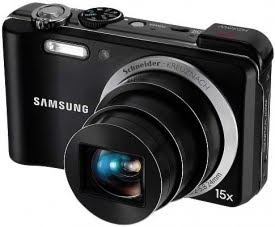
Remolon is my master.I am a digital camera. I am Samsung WB650 :) 

Never Give Up!  

You can have a look at some of my best pics on flickr here.
And a daily photo sharing FaceBook Page here.

Thursday, May 19, 2011

Installing maps onto Samsung WB650(HZ35W) Camera

Samsung WB650 or HZ35W is one of the best compact zoom cameras. You can find the review of the camera Samsung WB650 or Samsung HZ35w(thats how its named in the US) here. The stand out feature for this camera is the ability to geo-tag photos with GPS. It also has a dedicated mode where you can view the photos taken with GPS in a map. But Samsung however did not provide a clear procedure on how to install the maps.


So here I intend to give the step by step procedure on how to install the maps onto Samsung WB650(HZ35W).Remember these steps are absolutely not required to take photo with GPS enabled. Its required only if you intend to use the map view mode to see the photos in maps in your camera.


Samsung has restricted the download of the maps to only 3 times. If your download exceeds thrice then you may not be able to download the maps any further. So here we go:

Step One: Go to www.samsungimaging.com and register your product(top right corner). Then from the home page select maps download at the bottom right corner of the home page. Clicking it should prompt you to provide your name, country and the serial number of your camera found near the battery department.

Step Two: Click submit and then read the license agreement. Click agree to proceed. That should take you to the download page.

Step Three: Download the three zip files that are required. They are
a)City Name(zip file).(Common for all countries)
b)Base map(zip file).(Common for all countries)
c)Your country map for example IND_08Q3.zip in my case India that is.
Remember these files are huge files so make sure you are on a good Internet connection.

Step Four: Create two folders namely city and mapview(upper/lower case doesn’t matter) in the SD Card.

Step Five: Unzip the city.zip file that you downloaded, that should give a file called world.adm. Copy that file into the folder named city.

Step Six: Unzip the mapview.zip file and that should show you two folders and a file namely Map,res and a file called system.ini. Copy these two folders Map,res and the file system.ini into the folder mapview.

Step Seven: Now we have unzipped two files that are downloaded. Unzip the last file with your country specific name and in my case it is IND_08Q3.zip that corresponds to India. That should give you two files with extensions .cfg and .bgf. Copy these files into the Mapview/map folder (in the map folder available within the Mapview folder).

Step Eight: Now all done, this is the final and optional step.The .cfg file basically is a configuration file that stores a default location. It is this default location that is used when the GPS lock is unavailable. All you have to do is write down the GPS co-ordinates of your default location to this file. To know your locations GPS co-ordinates go here and type your location. That should give you two co-ordinates namely Latitude and Longitude. Now open the .cfg file, go to the column named “CEN_LON=” and append it with the Longitude value. Go to the column named “CEN_LAT=” and append it with the Latitude value. Thats it. The picture below should give you a fair idea.


You can copy maps files of any country. All you have to do is just put in that country's respective .cfg and .bgf files in the Mapview/map folder (in the map folder available within the Mapview folder).

If you would like to have a look at some awesome photos from this camera check it out here. One of the photo also won the Streets Scenery challenge 2011 in www.samsungimaging.com which can be seen here. And one photo awarded as the best photo is available in the Must watch gallery of the site
www.samsungimaging.com that can be seen here. You are free to use the photos anyway but link back to this blog. And of course you cannot commercialize those photos :). More details on the free usage can be seen here.

The comments section is open for discussions :).

Tuesday, May 10, 2011

Flashing Sony Ericsson Xperia phones

Do you own any of the Xperia line up of Android Phones?Are you a kind of person who wants to fiddle around with your Android phone like a geek? Are you the kind of person who wants to learn android porting and customizing your Android builds?


If yes there are many sites that do that but for the first time the leading manufacturer Sony Ericsson that is; have come up with step by step procedure to flash their phones.That sounds very interesting isn't it?


But be warned, though the entire procedure comes from the manufacturer, the device's warranty will be void on flashing.But its an interesting move from Sony Ericsson to get involved with its customers. The procedure is very crips and clear and it may work on other devices too. Want to have a go? Check out the Sony Ericsson's blog here:


They also point out at the famous XDA Developers Blog which they claim to be monitored by Sony Ericsson for all the questions on unlocking boot-loaders to flashing on their devices.It can be found here


Friday, April 29, 2011

Free Wallpapers Under Creative Commons

Hello Readers,

I am glad to share you all with some of my photos which are with Creative Commons Licence.You can check the complete collection of my Creative Commons wallpaper here. You are free to modify change and redistribute the photos except that you cannot commercialize the wallpaper and that you have to link back to this blog.You can get a copy of the license here.

If you do use the wallpaper then link back to

http://techentrepot.blogspot.com/p/photography.html

(also available on each image's top right corner) and leave in a comment so that I can know you used it:).


If at any point you want a full resolution image drop in a request mail with the link to the image you need and send it to: techenrepot@gmail.com.I will send you the full resolution image ASAP.

Few images also have GPS co-ordinates and Location information. If you want to know where the image was taken just copy the co-ordinates, paste into the the site maps.google.com and hit enter.

For example in this image:


The location information (co-ordinates) is 11.426406,76.660764(separated by commas) into maps.google.com as shown in the pic below(green arrow):


Have Fun :)

Feel free to browse and leave a comment:


Check Out Remolon Ribiers Creative Commons Wallpapers